 OrmyJoin the waitlist
Ormy › Guides
Persistent reminder apps that keep going until it's done
A normal reminder goes off once. These iPhone apps keep reminding you until you've actually done the thing. What each one does, and what's free.

I built Ormy, so I'm not neutral, and Ormy is on this list. Everything about the other apps comes from their own App Store pages and help pages, checked on 14 October 2026. If something has changed, email me and I'll fix it.
Why don't normal reminders work?
A normal reminder goes off once. It usually turns up while you're in the middle of something, so you swipe it away "for a second". By the time you've finished, it's gone, and the task has gone with it.
With ADHD this happens all the time. Research suggests ADHD makes it harder to remember to do something at a set time. Here's why ADHD makes you forget.
I'd set a reminder, swipe it away, and forget anyway. I wanted something that would keep on top of me, not notify me once and move on.
What makes a reminder hard to ignore?
Look for three things:
- It comes back until it's done. Not until you've swiped it away. Until you've marked it done.
- There's an alarm for the big stuff. For the few things that really can't slip, a real alarm that rings even on silent.
- It's where you'll see it. On your lock screen, not in a list you have to remember to open.
Due: pay once, and it repeats up to 10 times
Due has been around since 2010, and it's built around one idea: a reminder you miss comes back. Its Auto Snooze repeats a missed reminder every 1, 5, 10, 15, 30 or 60 minutes, until you mark it done or reschedule it. By default it repeats 5 times, and you can set it to 10.
It works on iPhone, iPad and Apple Watch, where you can mark reminders done or snooze them. It has Lock Screen widgets too. Due for Mac is sold separately.
Worth knowing: Due is a one-off purchase ($7.99 on the US App Store), with an optional yearly pass for new features. It has 4.7 stars on the US App Store.
TickTick: keeps going until you act, with Premium
TickTick is a popular to-do list, calendar and habit tracker. Its Constant Reminder keeps alerting you until you deal with the task: tick it off, snooze it or move it.
On iOS 26 or later, it can use a real system alarm. It fills your lock screen and rings even on silent or Do Not Disturb. On older iPhones, it repeats notifications instead. You can switch it on for every task, or just the important ones.
Worth knowing: TickTick is free, but Constant Reminder is a Premium feature, which is a subscription. TickTick runs on iPhone, iPad, Apple Watch, Mac, Windows and Android. It has 4.9 stars from over 46,000 people on the US App Store, and it's an Editors' Choice.
Ormy: nudges for an hour, then rings
Ormy is the one I built, for people with ADHD who set reminders and still forget. You tell it once, and it comes to you.
- It reminds you until it's done. Swiping an alert away isn't the same as doing it. So Ormy nudges you every few minutes, for up to an hour, until you've ticked it off.
- Still ignoring it? It rings. Switch on the alarm for the things that really can't slip. If an hour of nudges goes unanswered, Ormy rings a real alarm, even on silent or in a Focus. (Needs iOS 26 or later.)
- It's on your lock screen. When it's time, the reminder is on your lock screen and in the Dynamic Island, and you can tick it off right there.
- Big dates get warnings first. A birthday gets warnings from two weeks out, so there's time to buy the card.
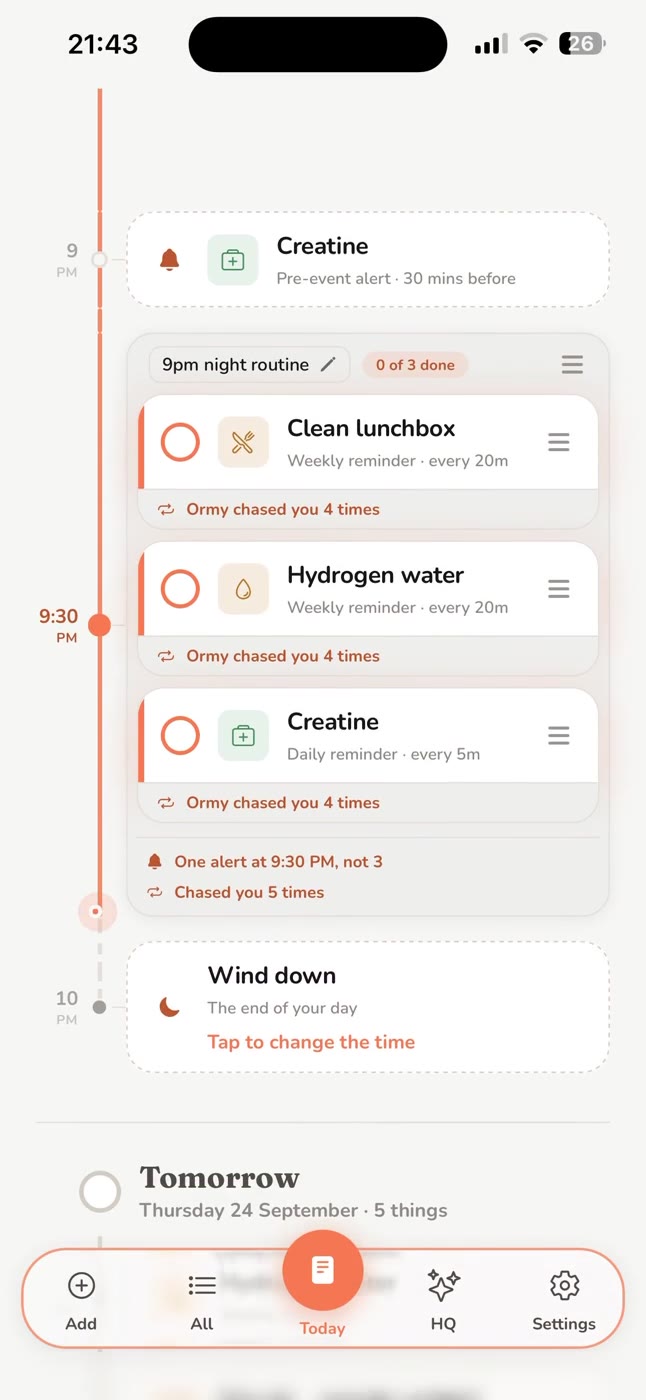
Worth knowing: Ormy is new, iPhone only, and coming soon. It's a subscription with a free trial, and there's no free version.
Free: Apple Reminders, with Urgent switched on
If you'd rather not pay for anything, start with the Reminders app that's already on your iPhone. Since iOS 26.2, you can mark a reminder as Urgent, and it rings an alarm when it's due, even when your phone is on silent or in a Focus.
To switch it on, tap the reminder, tap the info button, then turn on Urgent under Date & Time. You need iCloud Reminders switched on.
On an older iPhone, a Clock alarm does a similar job. Apple says silent mode and Do Not Disturb don't stop an alarm from sounding.
At a glance
| App | How it keeps at you | Price |
|---|---|---|
| Due | Repeats every 1 to 60 minutes, up to 10 times | Pay once |
| TickTick | Keeps going until you act, with an alarm on iOS 26 | Free, but this needs Premium |
| Ormy | Nudges for up to an hour, then an alarm | Free trial, then a subscription |
| Apple Reminders | Urgent reminders ring an alarm (iOS 26.2) | Free |
Questions people ask
What is a persistent reminder app? It's an app whose reminders keep coming back until you mark the task done, instead of going off once. Some, like Due, repeat a set number of times. Others, like TickTick and Ormy, can ring a real alarm.
Is there a free persistent reminder app? Apple Reminders is free, and since iOS 26.2 it can ring an alarm for any reminder you mark as Urgent. TickTick is free too, but its Constant Reminder needs Premium.
Is there a reminder app that stays on your lock screen? Ormy puts the reminder on your lock screen and in the Dynamic Island when it's due, and you can tick it off right there. TickTick's alarm, on iOS 26 or later, fills the lock screen until you act. Due has Lock Screen widgets that show what's coming up.
Which of these work on Android? TickTick works on Android, and so does its Constant Reminder. Ormy is iPhone only.
Why do I keep ignoring my reminders? A single alert is easy to swipe away without really reading it, especially in the middle of something else. With ADHD, by the time you've finished, it's gone. That's why it helps when a reminder keeps coming back. More on why ADHD makes you forget.
When can I get Ormy? It's coming to iPhone soon. Join the waitlist at getormy.com and you'll get an email the day it's out.
Kyle has ADHD and built Ormy because he kept forgetting the things he cared about most. He's not neutral, and says so.
Ormy is coming to iPhone
Join the waitlist and you'll get an email the day it's out.
Join the waitlistMore from Ormy
Sources (checked 14 October 2026)